flutter_quill
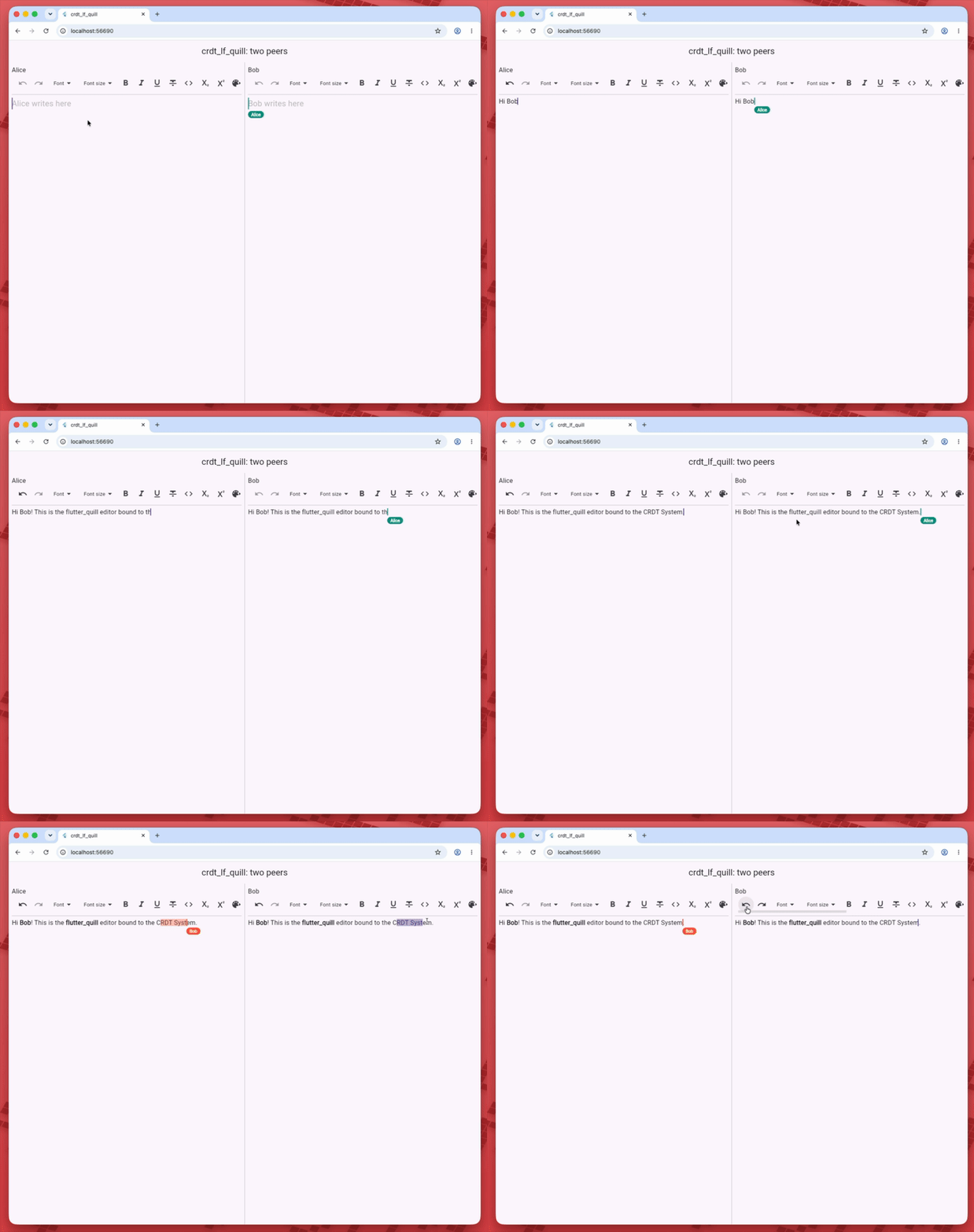
crdt_lf_quill makes a
flutter_quill editor collaborative.
CrdtQuillBinder keeps a QuillController in step with a
CRDTFugueRichTextHandler, so several peers
can edit the same document, with bold, links, headings, lists and embeds.
flutter pub add crdt_lf crdt_lf_flutter crdt_lf_quill flutter_quill
Usage
flutter_quill reads its texts from its localizations: add its delegate to the
app, or the toolbar throws MissingFlutterQuillLocalizationException. Here
Hive keeps the page on the device:
Future<void> main() async {
WidgetsFlutterBinding.ensureInitialized();
// On the web Hive uses IndexedDB and needs no path.
if (!kIsWeb) {
Hive.init((await getApplicationDocumentsDirectory()).path);
}
CRDTHive.initialize();
final backend = await CRDTHive.open();
runApp(EditorApp(backend: backend));
}
/// The app: one rich text page stored in [backend].
class EditorApp extends StatelessWidget {
/// Creates the app of the page stored in [backend].
const EditorApp({required this.backend, super.key});
/// Where the page is stored.
final CRDTStorageBackend backend;
Widget build(BuildContext context) {
return MaterialApp(
title: 'Editor',
// flutter_quill reads its texts from here, and throws without them.
localizationsDelegates: const [
GlobalMaterialLocalizations.delegate,
GlobalWidgetsLocalizations.delegate,
FlutterQuillLocalizations.delegate,
],
home: EditorPage(backend: backend),
);
}
}
Register a rich text handler on the document, provide the document with
CrdtProvider (from crdt_lf_flutter), and put the binder
above the toolbar and the editor. The State owns the controller:
// The State owns these: the binder never disposes them, and a new
// FocusNode on each build would drop the keyboard.
final _controller = QuillController.basic();
final _focusNode = FocusNode();
final _scrollController = ScrollController();
PersistentDocument? _page;
CRDTUndoManager? _undo;
void initState() {
super.initState();
unawaited(_open());
}
Future<void> _open() async {
final page = await widget.backend.openDocument('page');
final text = CRDTFugueRichTextHandler(page.document, 'page');
// Records only the edits made in this editor.
final undo = CRDTUndoManager(
page.document,
trackedOrigins: {crdtQuillOrigin},
)..track(text);
if (!mounted) {
undo.dispose();
return _close(page);
}
setState(() {
_page = page;
_undo = undo;
});
}
void dispose() {
_controller.dispose();
_focusNode.dispose();
_scrollController.dispose();
_undo?.dispose();
final page = _page;
if (page != null) {
unawaited(_close(page));
}
super.dispose();
}
static Future<void> _close(PersistentDocument page) async {
await page.persistence.dispose(); // writes what is still waiting
page.document.dispose();
await page.persistence.storage.close();
}
Widget build(BuildContext context) {
final page = _page;
if (page == null) {
return const Scaffold(body: Center(child: CircularProgressIndicator()));
}
return Scaffold(
appBar: AppBar(title: const Text('Editor')),
body: CrdtProvider.value(
value: page.document,
child: CrdtQuillBinder(
id: 'page',
controller: _controller,
// The editor, its shortcuts and the toolbar buttons undo through it.
undoManager: _undo,
builder:
(context) => Column(
children: [
// The binder gives the controller a new document: key the
// toolbar on it, so its undo and redo buttons follow.
ListenableBuilder(
listenable: _controller,
builder:
(context, _) => QuillSimpleToolbar(
key: ObjectKey(_controller.document),
controller: _controller,
config: const QuillSimpleToolbarConfig(
multiRowsDisplay: false,
),
),
),
const Divider(height: 1),
Expanded(
child: QuillEditor.basic(
controller: _controller,
focusNode: _focusNode,
scrollController: _scrollController,
config: QuillEditorConfig(
padding: const EdgeInsets.all(16),
// Shows an embed of another peer that has no builder.
unknownEmbedBuilder: crdtQuillUnknownEmbedBuilder(),
),
),
),
],
),
),
),
);
}
Edits made in the editor go into the handler. Changes from other peers show up in the editor.
- Keep
crdtQuillUnknownEmbedBuilder. Without it,QuillEditorthrows in its build as soon as a peer writes an embed it has no builder for, and the base editor has no builder for images or videos. - Key the toolbar on
controller.document. The binder gives the controller a newDocumentwhen it reads a handler. A widget that listens tocontroller.changeskeeps the stream of the document it was built with, and the undo and redo buttons ofQuillSimpleToolbardo so. Key the toolbar oncontroller.documentand rebuild it with the controller, as above. - Hide one
ChangeSource.crdt_lfandflutter_quillboth export aChangeSource. If you import both libraries in one file, hide thecrdt_lfone: Quill code uses the QuillChangeSource.
A change that arrives during a build (the first read of the handler, a new
controller, a write made in initState) reaches the editor at the end of that
frame, so a widget that listens to the controller can sit anywhere.
How it works
The binder gives the controller its own Document. That document writes every
local change into the handler right after Quill applies it, in one
transaction. A remote change becomes a Quill delta, applied as
ChangeSource.remote. When the binder reads the whole handler again, it applies
the difference as ChangeSource.silent, so the selection stays.
Do not assign controller.document yourself: the new document is not bound.
Its edits stay out of the handler, and the next read of the handler replaces it.
The converters are exported, so you can build your own binding:
richTextDeltaFromQuill(change, before): a Quill change to aRichTextDelta.quillRichTextWriter.write(handler, delta): writes aRichTextDeltainto the handler.quillDeltaFromRichText(delta, before): aRichTextDeltato a Quill change.quillDocumentFromSpans(spans): the handler value as a Quill document.
Pass document:, the Quill document before comes from, to the two delta
converters: an embed replaced in one change then maps to an update.
Units
Quill counts UTF-16 code units. The handler counts runes, so an emoji is one
place in the handler and two in Quill. The converters translate the offsets
against before, the plain text the change applies to.
An edit always lands on whole runes. A replace that starts or ends inside a surrogate pair takes the whole emoji, and an insert inside a pair goes before it. A lone half surrogate stays one place in the handler.
Attributes
Block keys (header, list, blockquote, code-block, indent, align,
direction, line-height) live on the '\n' that ends the line. They never
grow onto new text. Inline keys live on the text. A key with a null value
removes the attribute.
quillMarkExpand(key) says how a format grows when someone types at its edge:
| Key | Grows |
|---|---|
| Block keys | never (MarkExpand.none) |
link | never (MarkExpand.none) |
style, displayWidth (the size of an embed) | never (MarkExpand.none) |
Any other key (bold, italic, color, ...) | after its end (MarkExpand.after) |
New text in the handler takes the formats on its left. Quill sends the exact
attributes of each insert, so after an insert quillRichTextWriter sets the
formats Quill asked for and removes the others. When they already match, it
writes nothing more.
Embeds
Quill embeds (images, videos, formulas) are embeds of the handler, and back. An embed is one position in the handler.
-
Images and videos of
crdt_lf(insertImage,insertVideo) and native Quill images and videos are the same thing. A Quill{"image": url}comes to the handler as{"type": "image", "src": url}, sospan.imagereads it. An image with onlysrcgoes back to Quill native. One with more fields (alt,width, …) comes as{"crdt_lf": map}(crdtQuillEmbedType), so no field is lost when Quill writes it back. -
Size. The displayed width (
displayWidthin the handler) is thewidthof the Quillstylethat the image resize writes and the image builders read. The rest of thatstyle(height, alignment) is kept as Quill wrote it. -
Other embeds. Any other handler embed that is not a map of one key comes as
{"crdt_lf": map}too. To show these, pass your builders throughcrdtQuillEmbedBuilders: the builder of the embed'stype(or of the first key of the map that has one) shows it, else a small box (fallback). That builder gets one value and the style, not the other fields, and draws inline. -
crdtQuillUnknownEmbedBuildershows every other embed with the samefallback. Without it, an embed with no builder makesQuillEditorthrow in its build.QuillEditorConfig(embedBuilders: crdtQuillEmbedBuilders([...myBuilders]),unknownEmbedBuilder: crdtQuillUnknownEmbedBuilder(),) -
An embed replaced by another in one Quill change becomes an update of the same embed in the handler, so a concurrent format on it survives.
replaceTextwith anEmbeddablemakes two Quill changes, so it is a delete and an insert. -
A block embed (a video, a full-width image) keeps its own
'\n', which holds the block attributes. -
embedTypeslists the embed types the editor may write (image,video, a customtype);nulltakes all. It filters this editor only: a peer can still write any type, so keepcrdtQuillUnknownEmbedBuilderin place. -
An embed of a type out of
embedTypes, or with data the handler refuses (abovemaxEmbedBytes, nested too deep, aNaN), goes toonUnsupported. Each embed inserted in the editor is checked this way before it is written. A refusal deletes no embed:- when nothing else is written, the whole replace is dropped: the selection stays, its text included, and the caret does not move;
- when something else is written, such as the text of a paste, the selected text goes and the embeds of the selection stay.
-
An attribute value the handler refuses (a list, a
NaN) goes toonUnsupportedas{key: value}. The attribute is dropped, and the rest of the edit is written. -
Upload and rendering stay with the app. Keep large media outside the document and put a URL in the embed.
The last newline
A Quill document always ends with a '\n'. The handler stores that last newline
only when it is needed:
- When the last line is plain, the last
'\n'stays out of the handler. Two peers that start from an empty editor do not get two newlines. - When the last line has a block attribute (for example a heading), the handler
stores its
'\n'with the attribute. - When an empty plain last line follows a line with a block attribute, the
handler stores that last
'\n'too. Without it, the empty line would be lost.
Undo
The binder keeps changes from other peers out of the controller's undo stack,
like History(userOnly: true). Undo takes back your own edits only, and the
undo is sent to the other peers like any other edit.
For a history that understands formats and concurrent edits, pass a
CRDTUndoManager to the binder. The editor
then undoes through the manager, and the toolbar buttons follow it. A new
manager, or none, drops the steps of Quill's history.
final undo = CRDTUndoManager(
  document,
  trackedOrigins: {crdtQuillOrigin}, // only the edits made in the editor
)..track(handler);

CrdtQuillBinder(id: 'page', controller: controller, undoManager: undo, ...);
Typing close in time is one undo step (see captureTimeout). A format (bold,
a link, a heading) is always a step of its own, so typing a word and making it
bold takes two undos. Call undo.stopCapturing() to end a step by hand. The toolbar buttons refresh on
editor changes only: after undo.clear() they keep their state until the next
change.
Projection check
After each local write and each remote change, the binder compares the lengths
of the editor and the handler, and reads the handler again on a mismatch. A
debug build also compares the full content and throws on a mismatch, while
debugVerifyCrdtQuillProjection is true (the default). In the
benchmarks,
a local keystroke on a 50000-rune document takes 2.17 ms with the length check
and 3.40 ms with the full check.
Remote cursors
The binder publishes the local selection, and CrdtQuillCursorsOverlay draws
the other peers' carets and selections over the editor, with the labels and the
motion of CrdtTextCursorsOverlay.
Anchors are stable positions: they follow any edit, and they belong on a
presence channel, such as the
awareness plugin, never in the
document history.
CrdtQuillBinder(
  id: 'page',
  controller: controller,
  onSelectionAnchorsChanged: (base, extent) => publishPresence(base, extent),
  child: CrdtQuillCursorsOverlay(
    id: 'page',
    cursors: remoteTextCursors, // List<CrdtTextCursor> from presence
    child: QuillEditor.basic(
      controller: controller,
      focusNode: focusNode, // kept in a State, see below
      scrollController: scrollController,
    ),
  ),
);
Keep the FocusNode and the ScrollController of the editor in a State.
Cursors change often and rebuild the editor, and QuillEditor.basic makes new
ones on each build when you pass none: the user would lose the keyboard after
the first keystrokes.
The callback fires while the focus is inside the binder, and once with nulls
when the focus leaves or the handler is deleted. For mouse pointers, wrap the
editor in CrdtAwarenessCursorsOverlay.
Limits
- Two peers that format the plain last line at the same time both store a last
'\n', so the document gets one extra line. - The editor keeps its own selection, moved by each remote change.
- A remote selection is one caret high: it covers part of a line that holds a tall inline embed.
- Remote cursors move on document changes. After a layout change alone, such as an image that finishes loading, they stay until the next change.