CRDT LF Hive








A Hive storage implementation for CRDT LF objects, providing efficient persistence for Change and Snapshot objects with document-scoped organization.
Features
- Compact Binary Adapters: A single
TypeAdapterforChangeand one forSnapshot, each storing the object as the self-describing binary blob produced bycrdt_lf's nativetoBytes()/fromBytes()methods - Easy Initialization: One-line setup with
CRDTHive.initialize() - Document-Scoped Storage: Optional utilities that organize data by document ID for better isolation and performance
- Batch Operations: Efficient bulk save/load operations for changes and snapshots
Quick Start
1. Initialize Hive with CRDT Adapters
import 'package:hive/hive.dart';
import 'package:crdt_lf_hive/crdt_lf_hive.dart';

void main() async {
  // Initialize Hive
  Hive.init('./my_app_data');

  // Register all CRDT adapters
  CRDTHive.initialize();

  // Your app code here...
}
2. Document-scoped storage
import 'package:crdt_lf/crdt_lf.dart';
import 'package:crdt_lf_hive/crdt_lf_hive.dart';

final documentId = 'my-document-id';

// Open storage for a specific document
final changeStorage = await CRDTHive.openChangeStorageForDocument(documentId);
final snapshotStorage = await CRDTHive.openSnapshotStorageForDocument(documentId);

// Or open both at once
final documentStorage = await CRDTHive.openStorageForDocument(documentId);
3. Managing the boxes by hand
The low-level path, for an app that wants the boxes and not the storages:
import 'package:crdt_lf/crdt_lf.dart';
import 'package:hive/hive.dart';

// Open boxes manually
final changeBox = await Hive.openBox<Change>('changes');
final snapshotBox = await Hive.openBox<Snapshot>('snapshots');

// Store and retrieve changes
final change = /* your change */;
await changeBox.put(change.id.toString(), change);
final retrievedChange = changeBox.get(change.id.toString());
Many documents in one place
CRDTHive is a CRDTStorageBackend: it lists the documents it holds, hands out
the storages of each one, and deletes one whole. Code written against that
interface runs on any adapter, so an app can change backend without changing
anything but the line that opens it.
CRDTHive.initialize();
final backend = await CRDTHive.open();

for (final documentId in await backend.documentIds) {
  final note = await backend.readDocument(documentId);
  // ...show it in a list
}

await backend.deleteDocument('doc-123'); // changes, snapshots and identity
await backend.close();
Hive cannot list its boxes, and this adapter gives every document a box of its own, so
CRDTHive.open()keeps a small registry box (documentsby default). A document costs one extra row, written the first time it is opened. A document stored before this registry existed is not on the list until it is opened once — its data is untouched either way.
Keeping a whole document on disk
Most apps do not call these methods by hand. openDocument reads the document
back — its stored identity included — and follows it from there:
final note = await backend.openDocument(documentId);
final text = CRDTFugueTextHandler(note.document, 'body');
Everything written from there on is stored. The backend has the read-only half
too: readDocument(id) for a preview or a list, documentAt(id, version) for
the document as it was, copyDocumentTo(other, id) for a backup or a move to
another adapter.
It comes from crdt_lf_persistence,
which this package re-exports. See that README for the offline-first rules.
openStorageForDocument hands back a CRDTHiveDocumentStorage. Its close()
closes the two boxes of that document and nothing else — the one to reach for
in an app that opens one document after another, since
CRDTHive.closeAllBoxes() closes every Hive box the app has open, yours
included.
Hive has no transactions, so transaction() just runs its body. That is still
conformant: every step the persistence takes is safe to repeat.
Document-Scoped Storage
The library provides optional storage utilities that organize data by document ID. Each document gets its own dedicated Hive boxes, improving isolation and performance.
A Hive box holds its entries in memory, so reads here answer without
suspending — getChanges, getSnapshots, count and containsSnapshot are
not futures. Writes go through the box journal and stay asynchronous.
CRDTHiveChangeStorage
Manages Change objects for a specific document:
final changeStorage = await CRDTHive.openChangeStorageForDocument('doc-123');

// Save individual changes
await changeStorage.saveChange(change);

// Batch save multiple changes
await changeStorage.saveChanges([change1, change2, change3]);

// Load all changes for the document
final changes = changeStorage.getChanges();

// Or only part of the log, by version vector
final missing = changeStorage.getChanges(newerThan: theirVersion);
final past = changeStorage.getChanges(upTo: oldVersion);

// Delete changes
await changeStorage.deleteChange(change);
await changeStorage.deleteChanges([change1, change2]);

// Storage info
print('Total changes: ${changeStorage.count}');
CRDTHiveSnapshotStorage
Manages Snapshot objects for a specific document:
final snapshotStorage = await CRDTHive.openSnapshotStorageForDocument('doc-123');

// Save snapshots
await snapshotStorage.saveSnapshot(snapshot);
await snapshotStorage.saveSnapshots([snapshot1, snapshot2]);

// Retrieve snapshots
final snapshot = snapshotStorage.getSnapshot('snapshot-id');
final allSnapshots = snapshotStorage.getSnapshots();

// Check existence
if (snapshotStorage.containsSnapshot('snapshot-id')) {
  // Snapshot exists
}
CRDTHivePeerIdStorage
Keeps the PeerId the document writes under. Without it CRDTDocument mints
a new author on every restart, and the version vector grows by one peer per
session.
Every document shares one peer_ids box, keyed by document id: a box of its
own would cost an open for a single string. The value is text, so no type
adapter and no type id are involved.
Read it before building the document — the id has to exist first:
final peers = await CRDTHive.openPeerIdStorageForDocument('doc-123');

final document = CRDTDocument(
  documentId: 'doc-123',
  peerId: await peers.loadOrCreate(),
);
Snapshot Data Serialization
Snapshot is persisted via Snapshot.toBytes() (the same self-describing
binary format used everywhere else in crdt_lf). Each entry of Snapshot.data
is a Uint8List produced by the corresponding handler's getSnapshotState();
Snapshot itself only frames each blob with a length prefix.
Custom value types used inside CRDT handlers (e.g. CRDTListHandler<MyValue>)
work out of the box: the per-operation payload is serialized by the
ValueCodec<T> you pass to the handler — and the same codec is reused by the
handler to encode each item into its snapshot state. The whole pipeline is
binary end-to-end, with JSON only appearing as the default ValueCodec<T>
when the user does not provide a custom one.
Examples
Storage example
A complete example with a custom data type and adapter is available here.
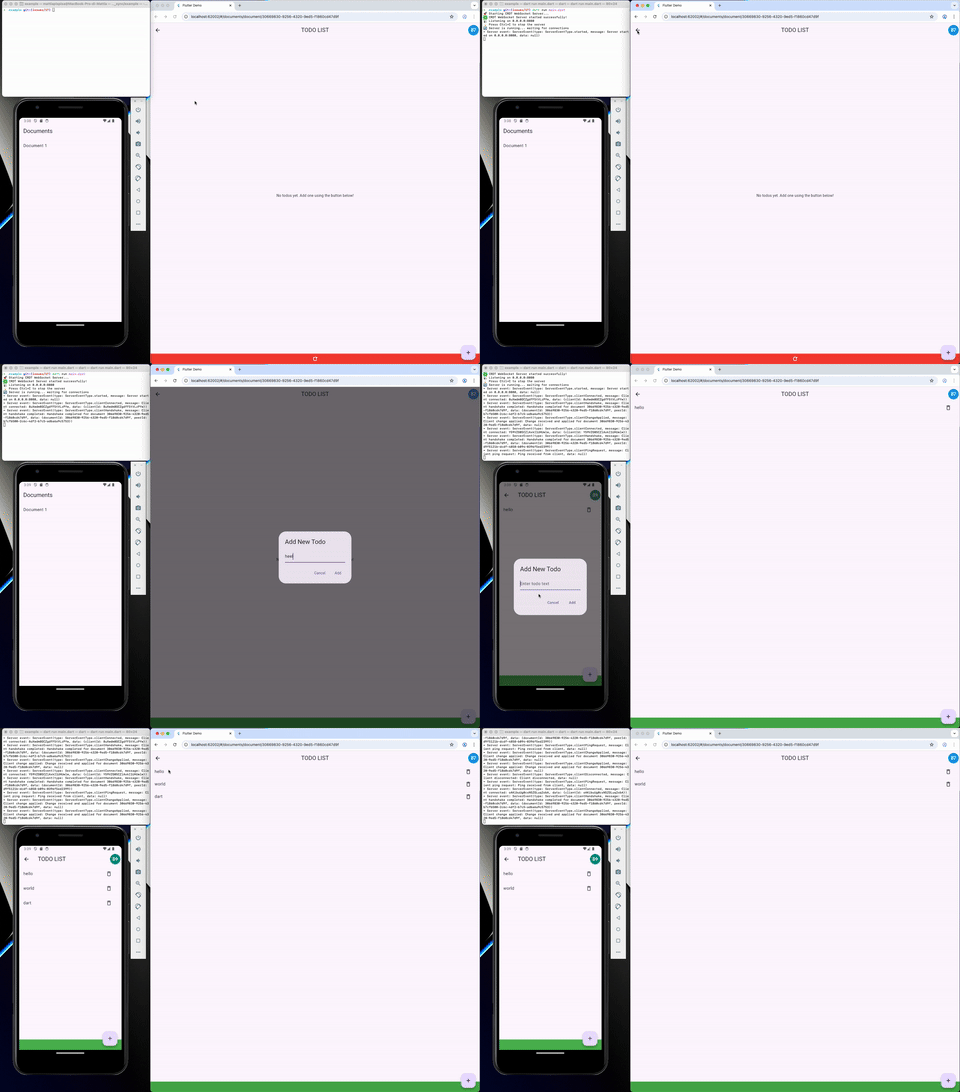
Server (+ storage) and clients
A complete example of a server with a persistent registry of documents and clients that can connect to the server and sync their data is available here.
Box Naming Convention
When using document-scoped storage, boxes are named using the pattern:
- Changes:
{boxName}_{documentId}(default:changes_{documentId}) - Snapshots:
{boxName}_{documentId}(default:snapshots_{documentId})
This ensures each document has isolated storage while allowing custom box name prefixes.
Two boxes are shared, one per app and not one per document:
peer_ids: thePeerIdeach document writes under, keyed by document id.documents: the list of document ids the backend holds.
Storage Management
Cleanup Operations
// Close all CRDT-related boxes
await CRDTHive.closeAllBoxes();

// Delete all data for a specific document
await backend.deleteDocument('doc-123');

// Delete a specific box
await CRDTHive.deleteBox('changes_doc-123');
Box Customization
// Custom box names
final changeStorage = await CRDTHive.openChangeStorageForDocument(
  'doc-123',
  boxName: 'my_custom_changes',
);

final documentStorage = await CRDTHive.openStorageForDocument(
  'doc-123',
  changesBoxName: 'custom_changes',
  snapshotsBoxName: 'custom_snapshots',
);
Important Notes
- Document-scoped storage utilities are optional - you can manage Hive boxes manually if preferred
- Custom box organization - the provided utilities use a specific box-per-document pattern, but you can implement your own organization strategy
- Type ID conflicts - ensure your custom adapters use unique type IDs
Roadmap
A roadmap is available in the project page. The roadmap provides a high-level overview of the project's goals and the current status of the project.
Apps
- greyhound_markdown — Real-time collaborative markdown editor built on crdt_lf
Packages
Other bricks of the crdt "system" are: