Rich text
CRDTFugueRichTextHandler is a Fugue text whose
characters carry attributes: bold, links, headings, colors. It can also
hold embeds: images, videos, mentions. Two peers that format the same text
converge: for each key, the newest format wins (highest clock, then peer id).
Formats follow
Peritext: A CRDT for Collaborative Rich Text Editing.
Formats
final text = CRDTFugueRichTextHandler(doc, 'note')
  ..insert(0, 'Hello world', attributes: {'bold': true})
  ..format(6, 5, 'link', 'https://example.com', expand: MarkExpand.none)
  ..format(0, 5, 'bold', null); // null removes the key
print(text.text); // Hello world
print(text.value); // the spans: runs of text with their attributes
print(text.attributesAt(6)); // {bold: true, link: https://example.com}
- An attribute is a key and a value:
null,bool,int, a finitedoubleor aString. Anintstays within ±(2^52 - 1).checkAttributethrows whatformatwould throw for a value, and writes nothing. valueis the list ofRichTextSpans, andtextis the plain string.inserttakes the formats around the text, plus its ownattributes. Withinherit: falsethe text gets exactly itsattributes.expandsays if text typed at an edge of the formatted range gets the attribute too:after(the default, like bold),before,bothornone(like a link). Text typed where text was deleted follows the same rule.- A snapshot keeps every format, so it grows with each
formatcall.
Line attributes
A '\n' formatted alone with expand: MarkExpand.none holds the attributes of
its line: a header, a list item. So does each '\n' that insert writes with
attributes. They never spread to the text typed next to it.
Embeds
An embed is an object in the text, such as an image, a video or a mention. It takes one position: the caret moves over it, formats cover it, and it is deleted like a character.
text
  ..insertEmbed(5, {'type': 'mention', 'user': 'ada'})
  ..updateEmbed(5, {'type': 'mention', 'user': 'grace'});
print(text.text); // "Hello world": U+FFFC stands for the embed
print(text.value[1].embed); // {type: mention, user: grace}
- The data is a map of
null,bool,int, finitedouble,String,Uint8List, and lists and maps of these, nested at most 16 deep. Name its kind in atypekey (richTextEmbedTypeKey), so readers can tell kinds apart. - Put the facts of the object (address, size, alt text) in the data, and what a user changes later (bold, link, displayed size) in marks.
textholds one U+FFFC (RichTextSpan.objectReplacement) per embed, so every rune index oftextis an index of every positional API.insertandupdaterefuse a text with U+FFFC: intextit is always an embed.- Concurrent
updateEmbeds of one embed resolve like formats: the newest wins. An update loses against a concurrent delete. Undo brings a deleted embed back with its data. insertEmbedattributes cover the embed alone. A block embed (a full-width image) is an embed followed by its own'\n', which holds the block attributes.
maxEmbedBytes (default 256 KiB, null for no limit) caps the data this peer
writes. Every byte stays in the change log until a snapshot and a prune, and
goes to every peer. Store large media elsewhere and keep a URL or a hash in the
embed. checkEmbed throws what insertEmbed would throw for some data, and
writes nothing.
Images and videos
insertImage and insertVideo write embeds of a fixed schema that every editor
adapter reads the same way. The file stays outside the document: src is a URL
or an address your app resolves (such as sha256:…), and a data: URI is
refused.
text.insertImage(
  0,
  Uri.parse('https://example.com/cat.png'),
  alt: 'A cat', // '' for a decorative image
  width: 1200, // intrinsic size: the space is kept before the file loads
  height: 800,
  displayWidth: 320, // a mark: what the user resized it to
);
text.insertVideo(1, Uri.parse('https://example.com/a.mp4'),
    poster: Uri.parse('https://example.com/a.jpg'),
    attributes: {'align': 'center'}); // a video is a block by default

final image = text.value.first.image; // RichTextImage?, null for other kinds
print(image?.alt); // A cat
print(text.value.first.displayWidth); // 320
| Kind | Data (type + fields) | Marks |
|---|---|---|
image | src, alt, title, width, height (intrinsic px, both or none), mime | displayWidth |
video | src, poster, title, width, height, mime | displayWidth |
- An image is inline by default and a video is a block: the embed and its own
'\n', written as one undo step, withattributes(such asalign) on the'\n'. RichTextImage.fromEmbed/RichTextVideo.fromEmbedread data strictly: a field of the wrong type givesnull. In the data, a field that is not given has no key. Keys they do not know survivecopyWith, so change an image withtext.updateEmbed(i, image.copyWith(alt: 'A dog').toEmbed()).- For other kinds, such as a YouTube link, insert your own
typewithinsertEmbed.
Following the changes
watch() emits a RichTextDelta: RichTextRetain, RichTextInsert and
RichTextDelete, with attributes where null removes a key. A delta that only
formats is a retain with attributes. Embeds come as RichTextInsertEmbed and
RichTextUpdateEmbed. See Handler deltas.
In Flutter
Two ways to put it on screen, depending on what your users need:
- Inline formats only (bold, italic, links, colors):
CrdtRichTextFieldBuilderfromcrdt_lf_flutteris aTextFieldthat paints them. See Text fields. - A full editor (headings, lists, images, a toolbar):
crdt_lf_quillbinds a flutter_quill editor to the handler. For another editor, the editor binding gives you the sync loop.
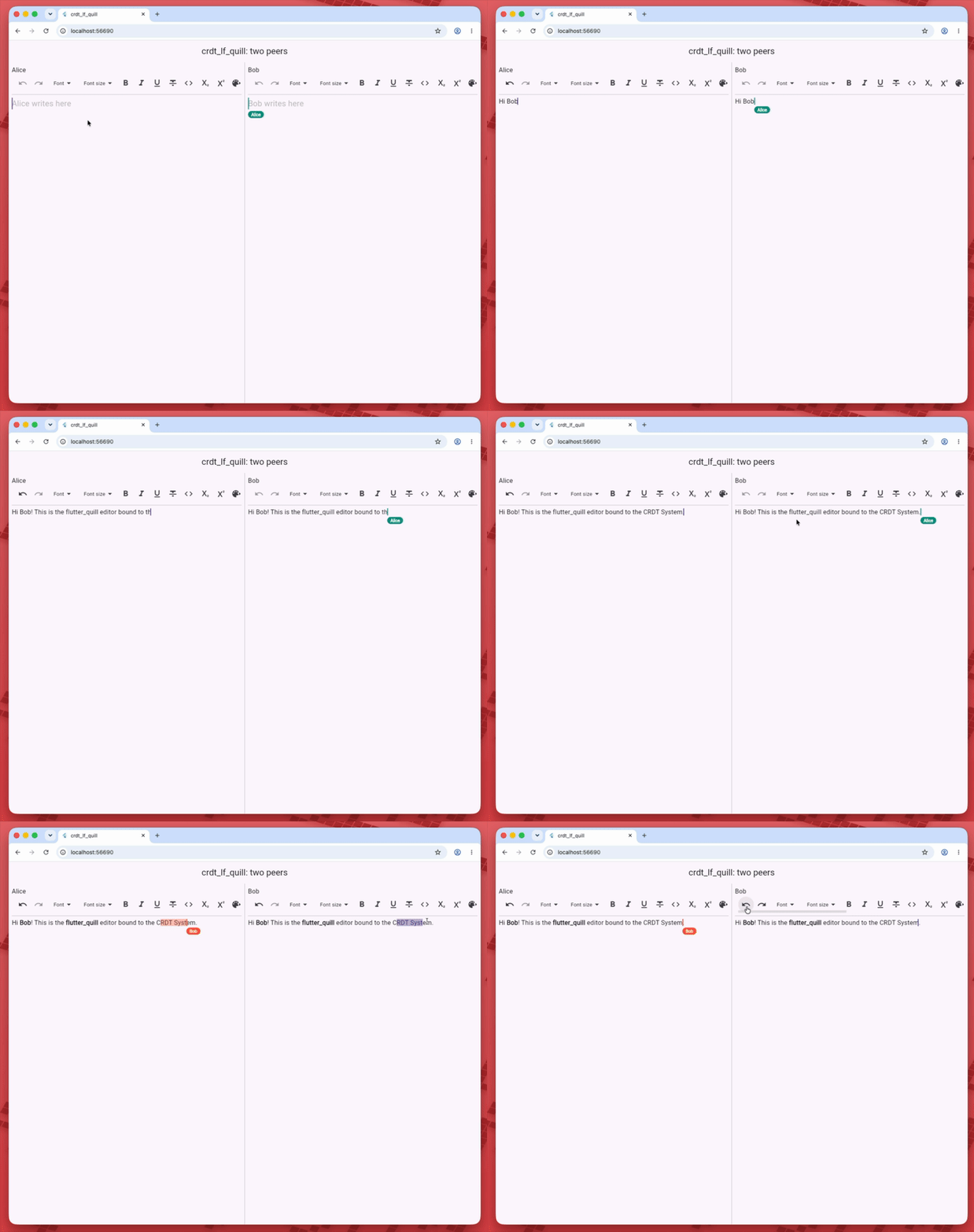
The flutter_quill example
The example of crdt_lf_quill
puts two peers side by side. Each one is a CRDTDocument with the same
CRDTFugueRichTextHandler, and each local change is sent to the other peer,
as a network would:
// Two peers of the same page, linked by hand instead of a sync client.
final alice = CRDTDocument(peerId: PeerId.generate());
final bob = CRDTDocument(peerId: PeerId.generate());
CRDTFugueRichTextHandler(alice, 'page');
CRDTFugueRichTextHandler(bob, 'page');
alice.localChanges.listen(bob.applyChange);
bob.localChanges.listen(alice.applyChange);
Each peer is a Quill toolbar and editor under a CrdtQuillBinder. The binder
reports the local selection, and CrdtQuillCursorsOverlay paints the caret of
the other peer:
CrdtProvider.value(
  value: document, // alice or bob
  child: CrdtQuillBinder(
    id: 'page',
    controller: controller, // a QuillController.basic()
    onSelectionAnchorsChanged: onAnchors, // to the other peer
    onUnsupported: (_) => showSnackBar('Part of the edit was not written'),
    builder: (context) => Column(
      children: [
        // The binder installs its own Quill document: key the toolbar on it.
        ListenableBuilder(
          listenable: controller,
          builder: (context, _) => QuillSimpleToolbar(
            key: ObjectKey(controller.document),
            controller: controller,
          ),
        ),
        Expanded(
          child: CrdtQuillCursorsOverlay(
            id: 'page',
            cursors: [?remoteCursor],
            child: QuillEditor.basic(
              controller: controller,
              config: QuillEditorConfig(
                unknownEmbedBuilder: crdtQuillUnknownEmbedBuilder(),
              ),
            ),
          ),
        ),
      ],
    ),
  ),
);
Type in one editor and make a word bold in the other: both
pages converge. In an app, replace the two listen calls with a
sync client. The
flutter_quill page covers
attributes, embeds, undo and the limits. For one editor that is saved on the
device, with undo, copy the
flutter_quill recipe.